Enhancements
Reservation Confirmation Outside Offering Schedule
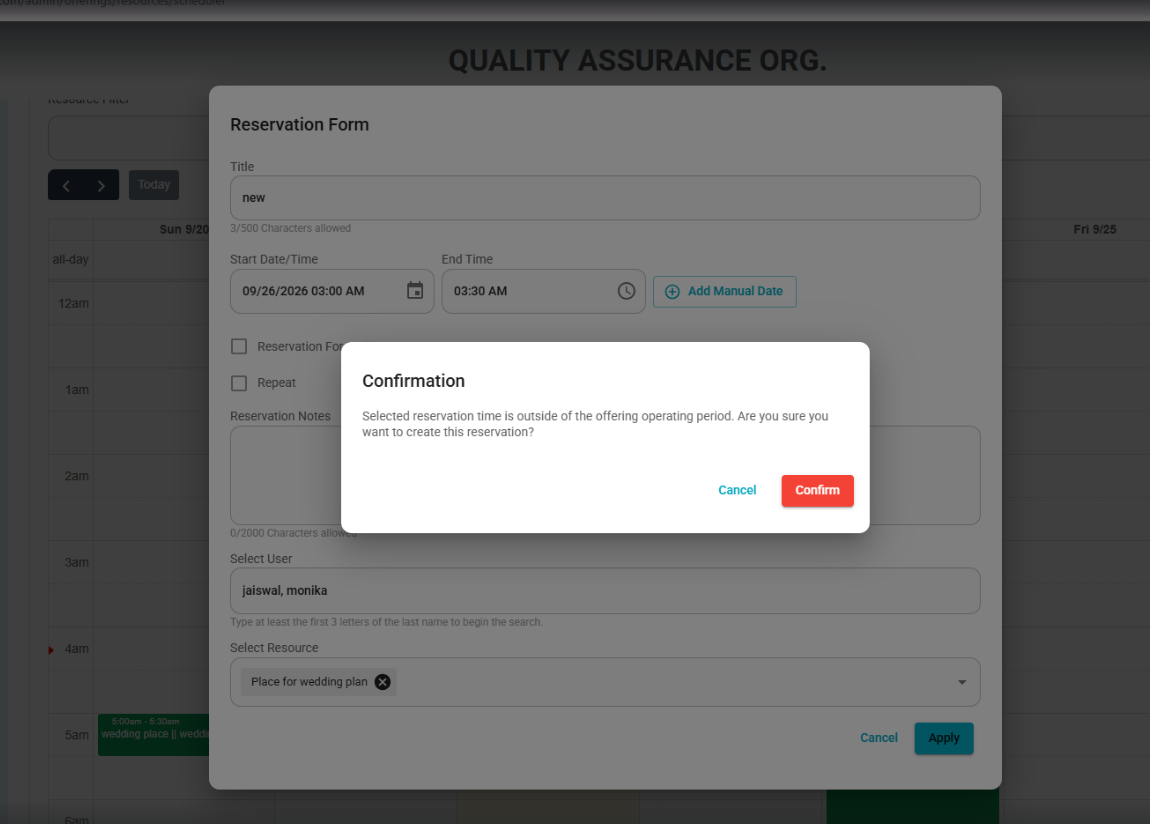
- Org Admins will now receive a confirmation prompt when creating or editing a reservation outside the offering’s defined operating period.
- The prompt allows the user to Confirm or Cancel before proceeding with the reservation.
Bugs
- Fixed: Last Operating Day Included in Operating Days
- The last day of a resource’s operating period is now correctly included as an Open operating day.
- Front Desk users and End Users can now create reservations on the final day of the configured operating period without being incorrectly blocked.
- Fixed: Reservation Items Can Be Added Multiple Times
- Reservation Items can now be added multiple times to the same reservation, as long as the item is active and has available stock.
- Previously, after an item was added once, it could no longer be selected when adding another item to the same reservation.
Fixed: Private Reservations Now Block Public-Facing Calendars
- Private reservations will now continue to appear as blocked time on public-facing calendars without displaying reservation details.
- Residents can see that a resource is unavailable, while private reservation information remains hidden.
Was this article helpful?
That’s Great!
Thank you for your feedback
Sorry! We couldn't be helpful
Thank you for your feedback
Feedback sent
We appreciate your effort and will try to fix the article