Arc Central
New Features and Enhancements
- Original Submission Type into Multiple Sub-types. If there is a single request with one submission type (e.g. "Addition to Home") but it contains multiple distinct items, such as pergola and landscaping—it may be split into sub-types. The processor can split one original submission into into several items for voting purposes.
| Block | Original Submission Type | VMS Submission Type (Sub-Types) |
| 1 | Addition to Home | Addition to Home |
| 2 | Addition to Home | Pergola |
| 3 | Addition to Home | Landscape |
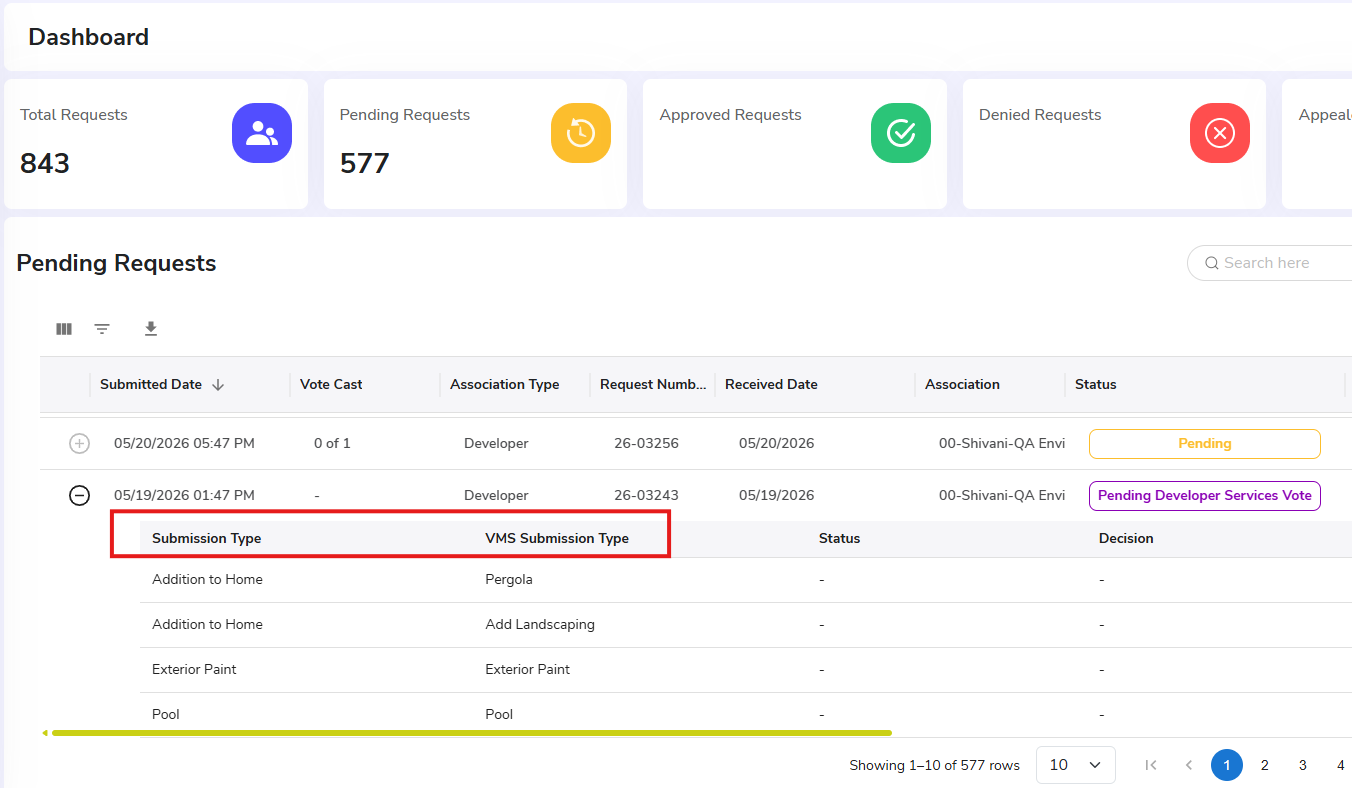
- ARC Central to VMS Integration Update to Request Creation. Previously, the action of Forwarding to Committe for a Vote would initiate a creation of request on VMS side. System has been updated so that VMS request creation is triggered when any of the following actions occur:
- Forward to Committee (For Vote) (previous behavior)
- Forward to Committee (View Only)
- Forward to 3rd Party Review
- UI Updates & Improvements. Improvement to Status and Decision display from the Transaction screen. Improved alignment for dashboard, requests and notifications.
Bug Fixes
- [Fix] ARC Central Add Multiple Users Issue. Resolved an issue where creating multiple users consecutively from the Add User screen, the system would fails on second user and "Add Role" button became unresponsive. User creation now continues as expected.
- [Fix] Syncing Block Vote Decisions to VMS Issue. Approved decisions on architectural review requests that contain block votes were not being synced to VMS. Resolved issue and decisions sync as expected
- [Fix] View Submission History. There was a delay displaying the most recent update on submission. Now, when an action is taken, the display is refreshed and action appears immediately in history tab.
- [Fix] Associations Dropdown Selection. After choosing from the 'Select Association' dropdown, the filtered data results as expected.
All Access Web
New Features and Enhancements
- Original Submission Type into Multiple Sub-types. If there is a single request with one submission type (e.g. "Addition to Home") but it contains multiple distinct items, such as pergola and landscaping—it may be split into sub-types. The processor can split one original submission into into several items for voting purposes. The Homeowner may now view these sub-types and status from All Access.
Bug Fixes
- None at this time
Was this article helpful?
That’s Great!
Thank you for your feedback
Sorry! We couldn't be helpful
Thank you for your feedback
Feedback sent
We appreciate your effort and will try to fix the article